Go Back   986 Forum - The Community for Porsche Boxster & Cayman Owners > Porsche Boxster & Cayman Forums > Boxster General Discussions

Post Reply
 
LinkBack Thread Tools Display Modes
Old 07-20-2017, 07:34 PM   #1
Registered User
 
Join Date: Jun 2016
Location: Quebec, Qc, canada
Posts: 93
Quote:
Originally Posted by Oldcarguy View Post
First of all, congrats on the new (to you) 986

Between my 2005 XKR and my 2004 986s, I've bought and tried 6 or 7 BT to FM devices. They are all plug and play as you requested but none of them come close to CD quality, especially if you are in a city with lots of FM stations. But, they will let you play your music today without modding your car. The one which performs the best in my context is the Nulaxy KM19:
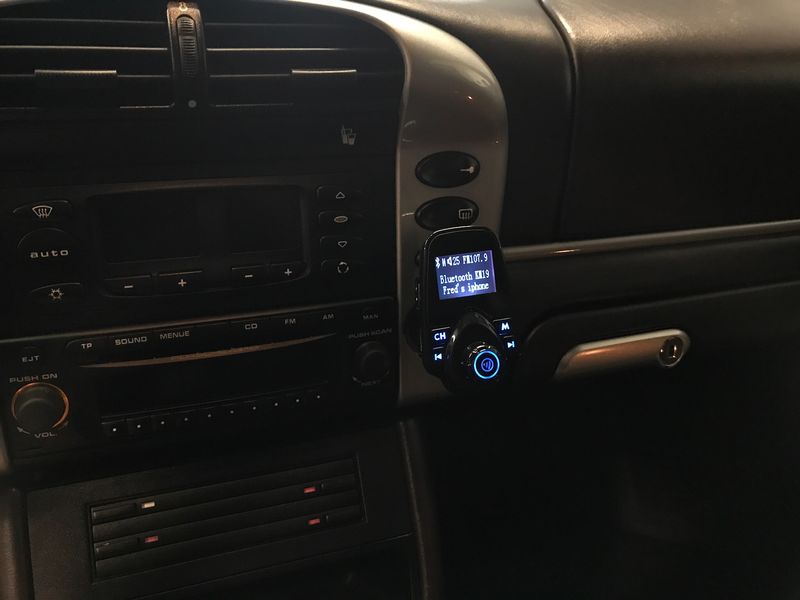


I have the best results (practically no distortion, no signal clipping and acceptable background white noise) by using FM 107.7 or 107.9, setting my iPhone 7 equalizer to 'small speakers' and 90% volume on the iPhone. I can answer the phone and use the KM19 buttons for next and prior song selection. It also has USB for phone charging and a second USB port for playing MP3??? (Just a guess, I've never tried it).

The KM19 has a 3.5 analog stereo input jack which might alleviate the clipping with without using the iPhone GE but the whole point for me was to keep the stock radio and not have any extra cables. There is a newer model of this unit available now on Amazon.

You do have to unplug the KM19 after each ride because it does not have a power switch and the 986 receptacle is always hot.

YMMV because these things are really sensitive to the particular car and surroundings.

Also, it works for me because the music only serves as a compliment to my Borla exhaust

I bought one similar of yours....(T10 fm transmitter). And I also installed an auxiliary input cable adapter on my 2002 base cdr-220 radio. I found out that the 1/8 audio jack on the side of these fm transmitter can also output music. So no need to use the Fm transmitter mode. Audio can go directly to the Aux in. May be yours can do the same ? Much better audio quality. I'm really happy with this setup.

Just sayin....
pomerlo is offline   Reply With Quote
Old 07-20-2017, 07:58 PM   #2
Registered User
 
Join Date: Sep 2008
Location: Florida
Posts: 2,497
Quote:
Originally Posted by pomerlo View Post
I bought one similar of yours....(T10 fm transmitter). And I also installed an auxiliary input cable adapter on my 2002 base cdr-220 radio. I found out that the 1/8 audio jack on the side of these fm transmitter can also output music. So no need to use the Fm transmitter mode. Audio can go directly to the Aux in. May be yours can do the same ? Much better audio quality. I'm really happy with this setup.

Just sayin....
Nope. Not going to do anything to make music better. BT, by nature, has audio quality on par with Decent FM radio....Frequency response, stereo separation and signal to noise are all about the same. If you transmit via BT and use the above device to convert to an AUX input (again, not really an option for your car), the signal is not improved is just isn't being modulated to a spot on the FM band. Modulation will affect signal to noise and , to a lesser extent stereo separation but it won't make the music CD quality just because it is now on a wire.


First off, adding AUX in via cable is not a viable option for 2003 and 04 cars. What to do? Lots of great ideas already posted so it gets down to price point and how stealth you want the installation to be.

The devices that plug in the cigarette lighter work well and run $20 - $30 online.
The iSimple Tranzit Blu will hide behind your dash, with only one small button (the size of a quarter) needing to be accessible. The device runs $75-$80 online and works great. It intercepts the signal coming from your antenna and switches it to your BT source. Think of it this way, it uses your antenna cable as an Aux in.

Congrats on your car..looks like you got a nice one!
dghii is offline   Reply With Quote
Post Reply


Posting Rules
You may not post new threads
You may not post replies
You may not post attachments
You may not edit your posts

BB code is On
Smilies are On
[IMG] code is On
HTML code is On
Trackbacks are On
Pingbacks are On
Refbacks are On


All times are GMT -8. The time now is 03:34 PM.


Powered by vBulletin® Version 3.8.7
Copyright ©2000 - 2026, vBulletin Solutions, Inc.
Content Relevant URLs by vBSEO 3.6.0
Copyright 2025 Pelican Parts, LLC - Posts may be archived for display on the Pelican Parts Website -    DMCA Registered Agent Contact Page