 10-12-2013, 07:30 PM
|
#1
|
|
Registered User
Join Date: Sep 2013
Location: Bay Area, CA
Posts: 310
|
Ipad mini in-dash installation
So searching around on the web, I've noticed that some people have installed an iPad mini into the front console of the Carrera (996) and the later year boxster (2003+). Both of these model years come with what is known as the horseshoe front bezel. This bezel has a slim, single cup holder right below the air vents that people have used to help install the iPad. The design on the console is different from those with Boxsters from 1997-2003 and so i didn't know if an iPad would fit in my Boxster.
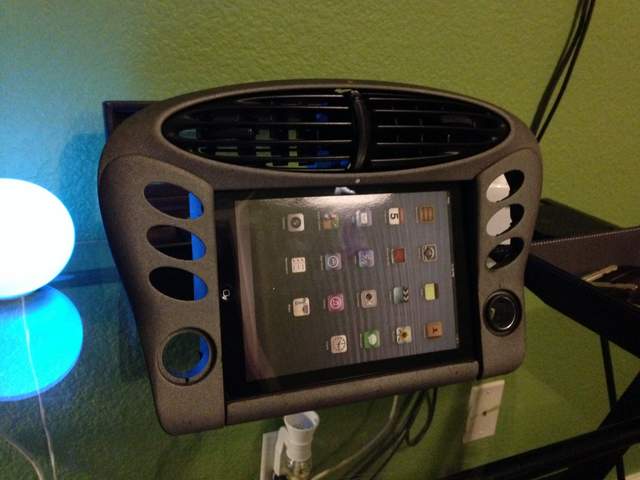
This weekend I tried experimenting with the possibility of putting an ipad mini in our version of the bezel. I'm not quite done with it but below is a picture of it so far. As it stands now, I'm pretty optimistic about it working. If there's enough interest in how to do this, I'll post some "along the way" photos and some instruction on how to accomplish this.
P.S. Don't mind the crappy iPad mini. I decided to use a fake one for testing rather than investing in a new one.
Last edited by Shehadehd; 10-12-2013 at 08:45 PM.
|

|

|
|
10-12-2013, 08:46 PM
|
#2
|
|
Registered User
Join Date: Sep 2013
Location: Bay Area, CA
Posts: 310
|
Here's the picture of how it looks so far
|
|
|
|
|
10-13-2013, 12:39 AM
|
#3
|
|
Registered User
Join Date: Aug 2013
Location: Bay Area
Posts: 700
|
It looks like there are some big gaps in the bottom. If you're going to post some "along the way" photos, let's do it right the first time?
Sent from my iPhone using Tapatalk - now Free
|
|
|
|
|
10-13-2013, 05:37 AM
|
#4
|
|
Registered User
Join Date: Feb 2008
Posts: 80
|
I like it! Nice work. How will you get it to turn off when you remove the key?
|
|
|
|
|
10-13-2013, 07:18 AM
|
#5
|
|
Registered User
Join Date: Jun 2012
Location: Bedford, TX
Posts: 2,760
|
Definitely interested. I have looked at those other threads too. I am planning on getting the new mini when it comes out since it should have the retina display. Looking forward to see what you come up with.
For those who haven't seen the 6speed post, here is the link:
iPad Mini in-dash install [996 MkII] - 6speedonline.com Forums
__________________
______________________________________________
2001 Boxster S Lapis Blue
TS Cat Bypass Pipes and exhaust
iPad Mini Dash Install
DEPO Tail Lights
|
|
|
|
|
10-13-2013, 07:31 AM
|
#6
|
|
Registered User
Join Date: Sep 2013
Location: Bay Area, CA
Posts: 310
|
Quote:
Originally Posted by epapp

It looks like there are some big gaps in the bottom. If you're going to post some "along the way" photos, let's do it right the first time?
Sent from my iPhone using Tapatalk - now Free |
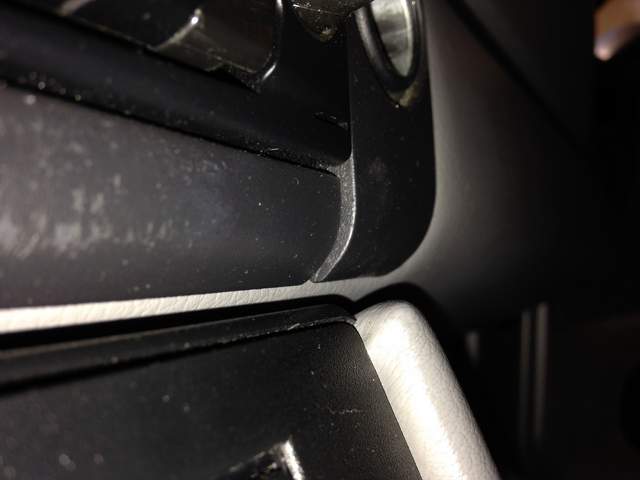
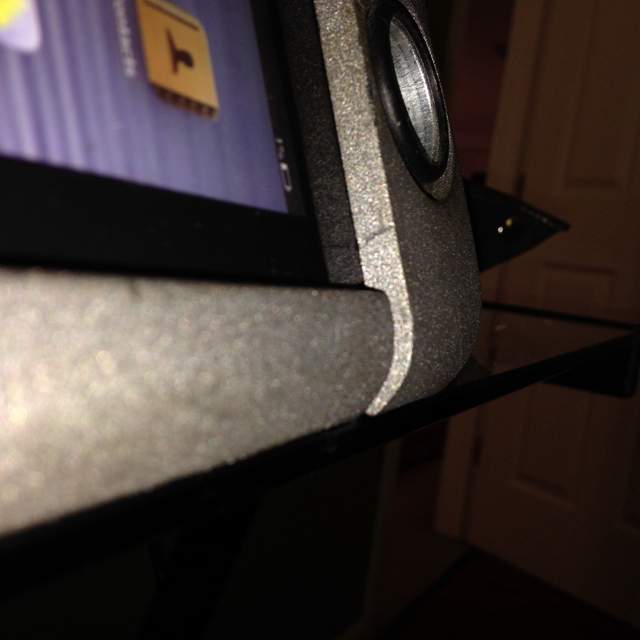
You must be looking at a different picture since I spent my day making sure the gaps are no different than those in the car already. If you have the same bezel arrangement in your car then you can see that the clover parts of the bezel are slightly raised from the the center portion, a couple mm or so.
Last edited by Shehadehd; 10-13-2013 at 07:34 AM.
|
|
|
|
|
10-13-2013, 07:35 AM
|
#7
|
|
Registered User
Join Date: Sep 2013
Location: Bay Area, CA
Posts: 310
|
Here is the original one in the car
Here is mine
|
|
|
|
|
10-13-2013, 07:39 AM
|
#8
|
|
Registered User
Join Date: Jun 2012
Location: Bedford, TX
Posts: 2,760
|
How much material have you had to remove? What head unit are you planning on using? Looks great so far!
__________________
______________________________________________
2001 Boxster S Lapis Blue
TS Cat Bypass Pipes and exhaust
iPad Mini Dash Install
DEPO Tail Lights
|
|
|
|
|
10-13-2013, 07:50 AM
|
#9
|
|
Registered User
Join Date: Sep 2013
Location: Bay Area, CA
Posts: 310
|
Quote:
Originally Posted by urban
I like it! Nice work. How will you get it to turn off when you remove the key?
|
Urban, I've been considering multiple options for this question. I plan on having the iPad Mini connected to a USB-to-cigarette-lighter that is wired behind the dash. That way, whenever the car is on, it will be powered.
Now, one thing I noticed is that the cigarette lighter is always hot in our boxsters. To get around this I've come up with two possible solutions. The first is that I'll wire a relay switch in series with the charger and connect it to a wire that only goes live when the car is on, effectively only letting the iPad charge when the car is on. The second option is to use the footwell lighting switch from the targa (available at ****************************************************) as a controllable switch so that the iPad charges only when I want it too and will automatically turn off when the car is off (because the switch will no longer be powered)
Thanks for all the support. I just ordered a radio removal tool so that I can get into my dash and do a quick swap for visual comparison.
Last edited by Shehadehd; 10-13-2013 at 08:34 AM.
|
|
|
|
|
10-13-2013, 07:57 AM
|
#10
|
|
Registered User
Join Date: Sep 2013
Location: Bay Area, CA
Posts: 310
|
Quote:
Originally Posted by BruceH
How much material have you had to remove? What head unit are you planning on using? Looks great so far!
|
I've removed the raised edges on the bezel. When I am able to get out the bezel in my car I'll do a picture comparison of the two. Basically I flattened the bezel. As far as the head unit goes, no idea. It just needs to have an aux in on the back lol. One other cool thing is that the iPad can connect to the OBD II system and provide real time engine diagnostics while driving 
I hear that epapp is working on a "true solution" for the IMSB problem that can actually give you realtime info about the IMSB condition and if it pans out well, there may be an app that you can put on the mini and monitor the IMSB while driving. *this is all speculation btw*
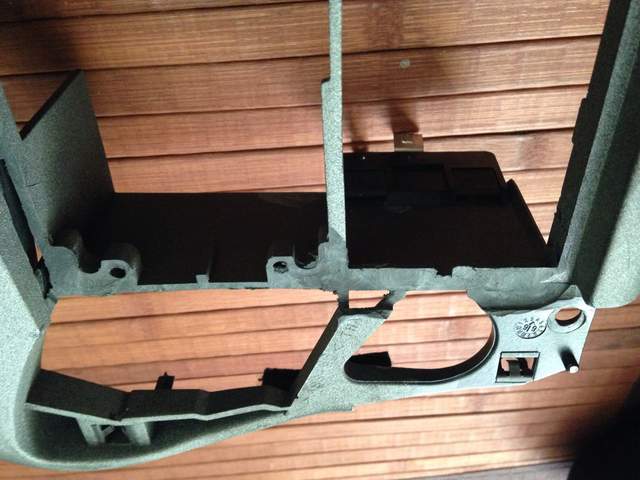
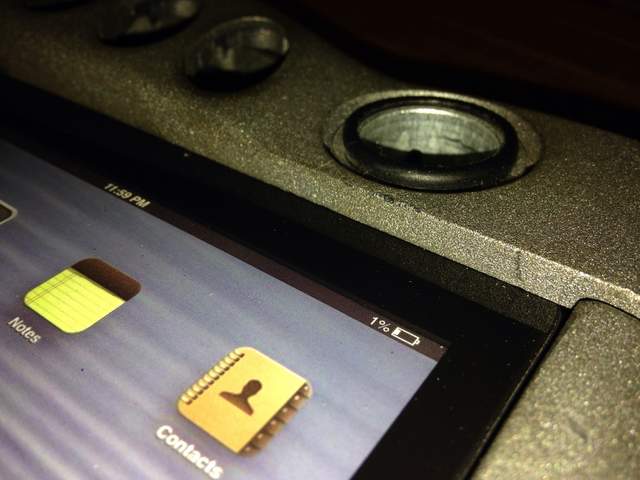
The result makes the iPad really flush with the clover portions if the bezel.
Last edited by Shehadehd; 10-13-2013 at 08:35 AM.
|
|
|
|
|
10-13-2013, 08:06 AM
|
#11
|
|
Registered User
Join Date: Jun 2012
Location: Bedford, TX
Posts: 2,760
|
Did you pick up a used trim piece? I've thought of doing that to practice on and or use, keeping the original if I wanted to go back to stock. Thanks for the pics.
__________________
______________________________________________
2001 Boxster S Lapis Blue
TS Cat Bypass Pipes and exhaust
iPad Mini Dash Install
DEPO Tail Lights
|
|
|
|
|
10-13-2013, 08:11 AM
|
#12
|
|
Registered User
Join Date: Sep 2013
Location: Bay Area, CA
Posts: 310
|
Quote:
Originally Posted by BruceH
Did you pick up a used trim piece? I've thought of doing that to practice on and or use, keeping the original if I wanted to go back to stock. Thanks for the pics.
|
There's a huge Porsche salvage yard by my work so I picked up a bezel to test on. There are some imperfections in it but I hope when I sand it and spray it, they will disappear. If you can find a cheap bezel, i'd recommend testing with it unless you're confident in your Dremel skills and know for a fact you want the iPad in there.
Last edited by Shehadehd; 10-13-2013 at 08:24 AM.
|
|
|
|
|
10-13-2013, 08:57 AM
|
#13
|
|
Registered User
Join Date: Jun 2012
Location: Bedford, TX
Posts: 2,760
|
Quote:
Originally Posted by Shehadehd
There's a huge Porsche salvage yard by my work so I picked up a bezel to test on. There are some imperfections in it but I hope when I sand it and spray it, they will disappear. If you can find a cheap bezel, i'd recommend testing with it unless you're confident in your Dremel skills and know for a fact you want the iPad in there.
|
That's what I was thinking also, thanks.
__________________
______________________________________________
2001 Boxster S Lapis Blue
TS Cat Bypass Pipes and exhaust
iPad Mini Dash Install
DEPO Tail Lights
|
|
|
|
|
10-13-2013, 08:59 AM
|
#14
|
|
Registered User
Join Date: Aug 2011
Location: Chicago
Posts: 475
|
Quote:
Originally Posted by Shehadehd
Urban, I've been considering multiple options for this question. I plan on having the iPad Mini connected to a USB-to-cigarette-lighter that is wired behind the dash. That way, whenever the car is on, it will be powered.
Now, one thing I noticed is that the cigarette lighter is always hot in our boxsters. To get around this I've come up with two possible solutions. The first is that I'll wire a relay switch in series with the charger and connect it to a wire that only goes live when the car is on, effectively only letting the iPad charge when the car is on. The second option is to use the footwell lighting switch from the targa (available at ****************************************************) as a controllable switch so that the iPad charges only when I want it too and will automatically turn off when the car is off (because the switch will no longer be powered)
Thanks for all the support. I just ordered a radio removal tool so that I can get into my dash and do a quick swap for visual comparison.
|
In my car there is a "Cell Phone Prep" behind the console that is tied only on with the ignition... I hard wired my radar detector into that, but it should word for your iPad, too. Not sure if all model years have that wiring, though.
__________________
Some kind of happiness is measured out in miles
2003 Midnight Blue S
LN IMS Retrofit
|
|
|
|
|
10-13-2013, 09:36 AM
|
#15
|
|
Registered User
Join Date: Jun 2012
Location: Bedford, TX
Posts: 2,760
|
I really like what Soundwaves of Tampa is doing with the magnetic mounts. Here is a link to some install pictures.
Soundwaves of Tampa, Florida (813) 849-1104 - Photo Gallery
With that mount, the head unit is behind the mini, so you could keep the cubby down below. Also, easy to pop the mini out and use it outside the car.
__________________
______________________________________________
2001 Boxster S Lapis Blue
TS Cat Bypass Pipes and exhaust
iPad Mini Dash Install
DEPO Tail Lights
|
|
|
|
|
10-13-2013, 10:13 AM
|
#16
|
|
Registered User
Join Date: Sep 2013
Location: Bay Area, CA
Posts: 310
|
The magnetic mount sounds like a really cool alternative. I wonder if it works on the 986 models? The reason I'm a bit skeptical is because the mini is slightly larger than the double din space, hence why some cutting of the trim piece is needed. To make the mini magnet mountable, I would imagine you would have to raise it I front of the bezel. This kind of ruins the OEM feel, IMO, and makes it look like an attachment. In the pictures I saw with the magnetic mount, the mini fit snug in the trim and looked "fully installed" rather than an add-on. Just my two cents.
__________________
If you are interested in a Comfort-Top module, please visit:
https://www.enhancedautomods.com/shop/comfort-top
|
|
|
|
|
10-13-2013, 10:19 AM
|
#17
|
|
Registered User
Join Date: Jun 2012
Location: Bedford, TX
Posts: 2,760
|
Quote:
Originally Posted by Shehadehd
The magnetic mount sounds like a really cool alternative. I wonder if it works on the 986 models? The reason I'm a bit skeptical is because the mini is slightly larger than the double din space, hence why some cutting of the trim piece is needed. To make the mini magnet mountable, I would imagine you would have to raise it I front of the bezel. This kind of ruins the OEM feel, IMO, and makes it look like an attachment. In the pictures I saw with the magnetic mount, the mini fit snug in the trim and looked "fully installed" rather than an add-on. Just my two cents.
|
Yea, I just said I really like it. I don't have the fabrication skills required and Soundwaves would charge a pretty penny to make it look OEM. They do nice work. I am sure if one was to send them a bezel they could fabricate something, but again, at what cost? Might have to contact them at some point and find out.
__________________
______________________________________________
2001 Boxster S Lapis Blue
TS Cat Bypass Pipes and exhaust
iPad Mini Dash Install
DEPO Tail Lights
|
|
|
|
|
10-13-2013, 10:43 AM
|
#18
|
|
Registered User
Join Date: Sep 2013
Location: Bay Area, CA
Posts: 310
|
Yeah, I agree with you, it looks killer! I don't doubt it will be expensive, especially when you mention it's for a Porsche lol.
__________________
If you are interested in a Comfort-Top module, please visit:
https://www.enhancedautomods.com/shop/comfort-top
|
|
|
|
|
10-13-2013, 11:00 AM
|
#19
|
|
Registered User
Join Date: Jun 2012
Location: Bedford, TX
Posts: 2,760
|
I saw mention of a price in an article that stated it was around $800 
__________________
______________________________________________
2001 Boxster S Lapis Blue
TS Cat Bypass Pipes and exhaust
iPad Mini Dash Install
DEPO Tail Lights
|
|
|
|
|
10-13-2013, 11:31 AM
|
#20
|
|
Registered User
Join Date: Sep 2013
Location: Bay Area, CA
Posts: 310
|
Ipad mini in-dash installation
Does that include the iPad mini? I can't imagine they're going to charge $800 just to make the trim.
__________________
If you are interested in a Comfort-Top module, please visit:
https://www.enhancedautomods.com/shop/comfort-top
Last edited by Shehadehd; 10-13-2013 at 11:54 AM.
|
|
|
|
 Posting Rules
|
You may not post new threads
You may not post replies
You may not post attachments
You may not edit your posts
HTML code is On
|
|
|
All times are GMT -8. The time now is 08:05 PM.
| |



 Boxy Grannis
 Growly Grannis/Sex stallion
 2001 Boxster S
 Linear Mode


