06-21-2010, 02:08 AM
|
#1
|
|
Registered User
Join Date: Dec 2007
Location: Seattle
Posts: 735
|
Do you have a spare key to try? The circuit board in the key may have gone bad. If the other key still works, then that is likely what happened.
I bought key at the stealership when I got the car 2½ years ago and kept it as a spare. When the button cover on the original key wouldn't stay snapped on, I got the new key out. I figured since I paid $250 for it, I might as well get some use out of it. It worked for a month and then the same thing happened to me, the buttons wouldn't activate the alarm anymore. Tried a new battery, and still nothing. The LED blinks fine. The old key works fine. Went back to the stealership to see if there was anything that could be done, since for all practical purposes, the key was nearly unused. They told me that since it was out of warrantee, there was nothing they could do. I would have to fork over another $250 for a new key.
To solve my problem, I took the circuit board out of the old key and put it in the new key fob. I keep the old key as a spare now, and buy all my parts as far away from the stealership as possible. Thank goodness for the Internet parts resources.
|

|

|
|
06-21-2010, 09:32 AM
|
#2
|
|
Registered User
Join Date: Oct 2008
Location: sw ohio
Posts: 253
|
reactivate remote key fob
Guys-
Bear with me a few minutes, I've reactivated key fobs several times, but I didn't take notes. One of these methods works, none do any harm.
Put your good (fob) key in ignition and turn right one click to activate accessories. Leave it in that position and close door, MAKE SURE key w/bad fob is in your hand!
Press and keep pressed the key fob button for the door locks and insert key into door lock keeping button pressed. Turn key in door lock as as you were locking then unlocking door 2 times, keeping button pressed. Release button and remove key. Manually unlock door and remove good key from ignition. Now shut door and see if fob works. If not, try various combinations of routine. e.g. unlock and then lock door 2 times. There are only so many variations on the theme. I just can never remember which. Within the last hour I reactivated my key using one of the combinations within 3 minutes.
I have to reactivate one of my keys every 6 weeks or so for this reason: When I drive my Boxster, I have Boxster key only, no other keys, in the ignition to minimize load on ignition switch. I use the Boxster key on my key ring, which carries all the other car keys, house keys, etc... to unlock my cars because I just about always have to have move cars around to get to the Boxster. Therefore my single Box key fobs rarely used to unlock. After 5 weeks or so, I have to reactivate fob buttons.
More info on Renntech.org. Search "remote key transmitter fix."
Last edited by jotoole; 06-21-2010 at 10:52 AM.
Reason: additional info
|
|
|
|
|
12-22-2010, 07:17 AM
|
#3
|
|
Registered User
Join Date: Dec 2010
Location: Hot Springs Village, Arkansas
Posts: 245
|
Reviving an old thread. Can anybody confirm the viability and correctness of these instruction? One of my remotes doesn't work but the led blinks when a button is pushed and I've put in a new remote battery. When I try to reactivate the inoperable remote with these directions I get a beep each time I cycle the door lock but the remote still doesn't do anything afterward.
Quote:
|
Originally Posted by jotoole
Guys-
Bear with me a few minutes, I've reactivated key fobs several times, but I didn't take notes. One of these methods works, none do any harm.
Put your good (fob) key in ignition and turn right one click to activate accessories. Leave it in that position and close door, MAKE SURE key w/bad fob is in your hand!
Press and keep pressed the key fob button for the door locks and insert key into door lock keeping button pressed. Turn key in door lock as as you were locking then unlocking door 2 times, keeping button pressed. Release button and remove key. Manually unlock door and remove good key from ignition. Now shut door and see if fob works. If not, try various combinations of routine. e.g. unlock and then lock door 2 times. There are only so many variations on the theme. I just can never remember which. Within the last hour I reactivated my key using one of the combinations within 3 minutes.
I have to reactivate one of my keys every 6 weeks or so for this reason: When I drive my Boxster, I have Boxster key only, no other keys, in the ignition to minimize load on ignition switch. I use the Boxster key on my key ring, which carries all the other car keys, house keys, etc... to unlock my cars because I just about always have to have move cars around to get to the Boxster. Therefore my single Box key fobs rarely used to unlock. After 5 weeks or so, I have to reactivate fob buttons.
More info on Renntech.org. Search "remote key transmitter fix."
|
|
|
|
|
|
12-22-2010, 09:42 PM
|
#4
|
|
Registered User
Join Date: Dec 2007
Location: Seattle
Posts: 735
|
Quote:
|
Originally Posted by Dale_K
Reviving an old thread. Can anybody confirm the viability and correctness of these instruction? One of my remotes doesn't work but the led blinks when a button is pushed and I've put in a new remote battery. When I try to reactivate the inoperable remote with these directions I get a beep each time I cycle the door lock but the remote still doesn't do anything afterward.
|
Tried the same thing with the bad "new" key and it did not work for me either.
|
|
|
|
|
12-23-2010, 01:08 AM
|
#5
|
|
Registered User
Join Date: Dec 2007
Location: Seattle
Posts: 735
|
post deleted
Last edited by Spinnaker; 06-07-2012 at 10:15 PM.
|
|
|
|
|
12-23-2010, 01:58 AM
|
#6
|
|
Registered User
Join Date: Oct 2008
Location: sw ohio
Posts: 253
|
Someone sent me a PM a while back saying it didn't work for him, either. So I went out with my now inoperable key (which by the way is the car's original key) and went through the routine I described, and various other sequences. No luck. The only thing I can think of that is different is the much longer time period between attempts at the fix. Did not mean to mislead anyone and apologize if I wasted anyone's time. But it did work for me several times unless it was just several coincidences. Go figure.
|
|
|
|
|
12-23-2010, 04:51 AM
|
#7
|
|
Registered User
Join Date: Dec 2010
Location: Hot Springs Village, Arkansas
Posts: 245
|
Thanks for the answers, even though they are negative. At least the car came with one operating remote. I wonder if it's worth bothering to bring it up with the repair shop. I assume there is some kind of training or notification process with the car's security system when a new remote is purchased and maybe applying that process would make the non functional remote operable again. Maybe it's not worth the trouble if these remotes are known to loose their connection on a fairly common basis.
|
|
|
|
|
06-05-2014, 11:48 AM
|
#8
|
|
Registered User
Join Date: Jun 2014
Location: Bournemouth UK
Posts: 2
|
Quote:
Originally Posted by Dale_K

Reviving an old thread. Can anybody confirm the viability and correctness of these instruction? One of my remotes doesn't work but the led blinks when a button is pushed and I've put in a new remote battery. When I try to reactivate the inoperable remote with these directions I get a beep each time I cycle the door lock but the remote still doesn't do anything afterward.
|
The process of 'wakening'the receiver, after a dormant period ( the car not the remote) involves locking and unlocking the door using the blade, then attempt to use the remote to operate the lock, which then disarms the alarm. This is not 'activate/ reactivate' -ing the remote or coding or fixing the remote.
Generally, after 10 yrs or so, the buttons deteriorate and the board starts suffering from dry joints- So a good reflow by a good solderer should sort out the problem. At times you find cracked components or RF modulator, controller chip/ processor going faulty and there isn't anything you can do to repair as you can't get hold of these and even if you manage to find them, you still have to do the recoding, etc. which is outside the realm of the average man! Even the crystal is not easy to find! So you end up forking out Porsches extortionate prices for a new one! Sad but true!
Last edited by cellutron; 06-05-2014 at 11:59 AM.
|
|
|
|
|
10-23-2014, 07:04 AM
|
#9
|
|
Registered User
Join Date: Aug 2012
Location: mexico
Posts: 173
|
I thought it was normal that after a prolonged time without use that you had to use the key in the door and that reactivated the remote. is this not the case? I know if I leave mine sitting for a week or so that is the norm for me and thats what the previous owner told me.
Last edited by tanque55; 10-23-2014 at 08:32 AM.
|
|
|
|
|
01-08-2015, 04:26 PM
|
#10
|
|
Registered User
Join Date: Dec 2014
Location: California
Posts: 246
|
Does anyone know the specifications of the 'oscillator' on the circuit board? I opened my key fob and the oscillator is missing. Please see attached pic with the two points marked up with circles. One of the micro-switches had come off so I soldered it (still need to clean out the pcb...). When I press the switches the LED does flash but none of the doors open. I think it is because I am missing the oscillator part.
I have just bought the 2004 Boxster and cannot lock it. Something is also wrong in the door lock mechanism as the key swings freely when put in the door. But that is another problem. Need to first fix the fob issue.
Also does anyone have a spare/junk pcb for the key fob (for a 2004 Boxster)?
Appreciate any help. 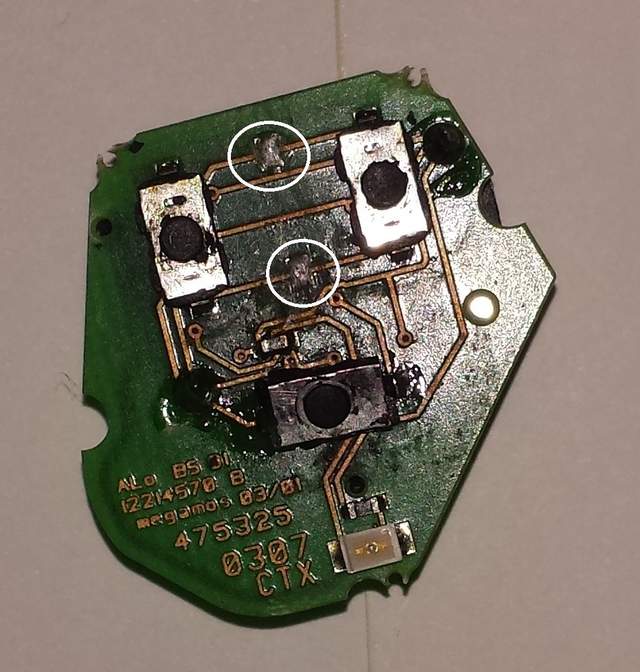
|
|
|
|
| Thread Tools |
|
|
| Display Modes |
 Hybrid Mode Hybrid Mode
|
 Posting Rules
|
You may not post new threads
You may not post replies
You may not post attachments
You may not edit your posts
HTML code is On
|
|
|
All times are GMT -8. The time now is 12:10 AM.
| |