 11-09-2013, 05:04 PM
|
#81
|
|
Registered User
Join Date: Sep 2013
Location: Bay Area, CA
Posts: 310
|
Ipad mini in-dash installation
Quote:
Originally Posted by BruceH

I picked up a 64gb mini last night from CL and I also got a used horseshoe off of eBay. My plan is to use the stock CDR-220 for now since I already have a 30 pin adapter for my iPhone. The 30 pin to lightening adapter is on its way, another eBay purchase.
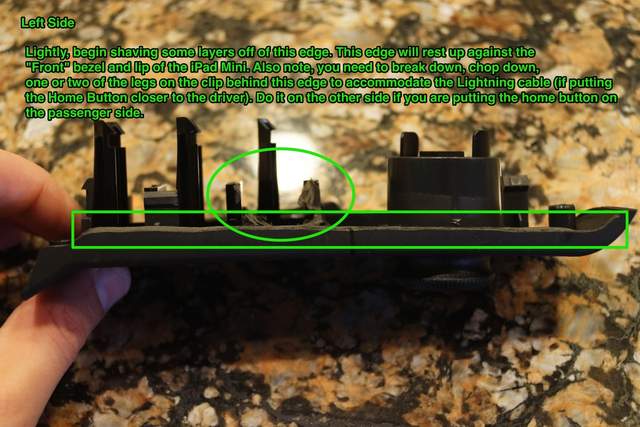
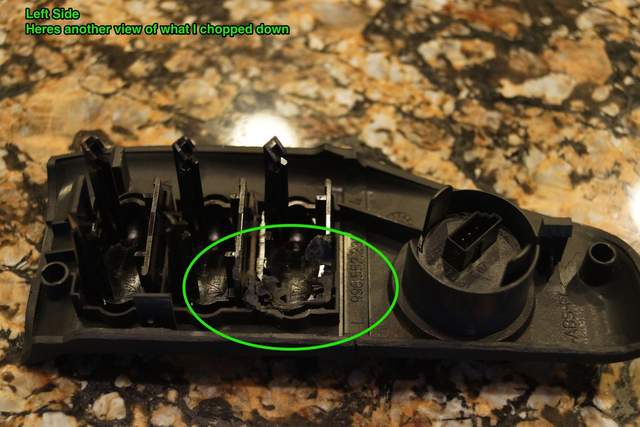
Shehadedh, My first question (I will probably have more) is, did you have to grind away on the side wings at all? Looking at the 996 install thread, the guy who had the 2001 996 ground quite a bit but it looks like you didn't.
Here are some of his pics:
 |
Nice! Glad to hear that someone else is doing the installation!
I'll have to review the horseshoe tutorial on the install, but I chose to grind down the radio trim rather than the horseshoe/ cloverleaf. As a result, I didn't have to cut into the visible edges of the trim. I think there are some pictures in the previous ports that show what I mean.
Now, as for the back of the horseshoe/ cloverleaf, that does need some modifying. Here is a picture


I've cut this

So that I don't have to cut here

You will have to trim a bit into the cigarette lighter shield and into some of the back casing of the blank switches. I'll probably take apart my setup tomorrow to add a new switch so I'll take a bunch more pictures for you.
One thing I want to advise you on is that there is barely any room for the headphone jack or lightning cable. A 30 pin to lightning adapter will most likely not fit. I may be wrong, but take a look at the picture and decide for yourself. Good luck and ask away.
__________________
If you are interested in a Comfort-Top module, please visit:
https://www.enhancedautomods.com/shop/comfort-top
Last edited by Shehadehd; 11-09-2013 at 05:09 PM.
|

|

|
|
11-09-2013, 09:50 PM
|
#82
|
|
Registered User
Join Date: Jun 2012
Location: Bedford, TX
Posts: 2,755
|
The 30 pin adapter I got is this one:
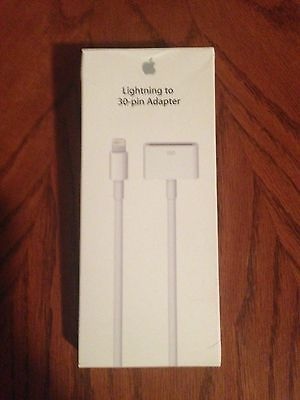
I knew there wouldn't be room for the one without the cable. Thanks for the pics, I really didn't want to grind on the visible parts of the side pieces if I didn't have too. I wasn't planning on using the audio out jack either. The adapter should take care of my audio needs. Hopefully I will start grinding tomorrow. 
__________________
______________________________________________
2001 Boxster S Lapis Blue
TS Cat Bypass Pipes and exhaust
iPad Mini Dash Install
DEPO Tail Lights
|
|
|
|
|
11-10-2013, 03:05 PM
|
#83
|
|
Registered User
Join Date: Jun 2012
Location: Bedford, TX
Posts: 2,755
|
Having trouble with the radio wiring harness. I am just short on the yellow connector and the black connector. Was your harness long enough to relocate the radio to the lower console? I am going to have to find an extension for mine. My dremel work is complete though!
__________________
______________________________________________
2001 Boxster S Lapis Blue
TS Cat Bypass Pipes and exhaust
iPad Mini Dash Install
DEPO Tail Lights
|
|
|
|
|
11-10-2013, 05:15 PM
|
#84
|
|
Registered User
Join Date: Sep 2013
Location: Bay Area, CA
Posts: 310
|
Ipad mini in-dash installation
Quote:
Originally Posted by BruceH
Having trouble with the radio wiring harness. I am just short on the yellow connector and the black connector. Was your harness long enough to relocate the radio to the lower console? I am going to have to find an extension for mine. My dremel work is complete though!
|
The wire extension is a *********. To make those plugs long enough I had to thread down down the same side they came from. Even then, they are only long enough to put the radio fully in the lower console and the plug them in. It's a hassle, but I didn't want to extend them.
You can see the wires here:

They went down here:

But watch out for this tab here

The tab is in between the upper and lower console and in the center. Make sure you are leading the wires to the right side so that you have enough left to plug in the connector
__________________
If you are interested in a Comfort-Top module, please visit:
https://www.enhancedautomods.com/shop/comfort-top
Last edited by Shehadehd; 11-10-2013 at 05:17 PM.
|
|
|
|
|
11-10-2013, 06:33 PM
|
#85
|
|
Registered User
Join Date: Jun 2012
Location: Bedford, TX
Posts: 2,755
|
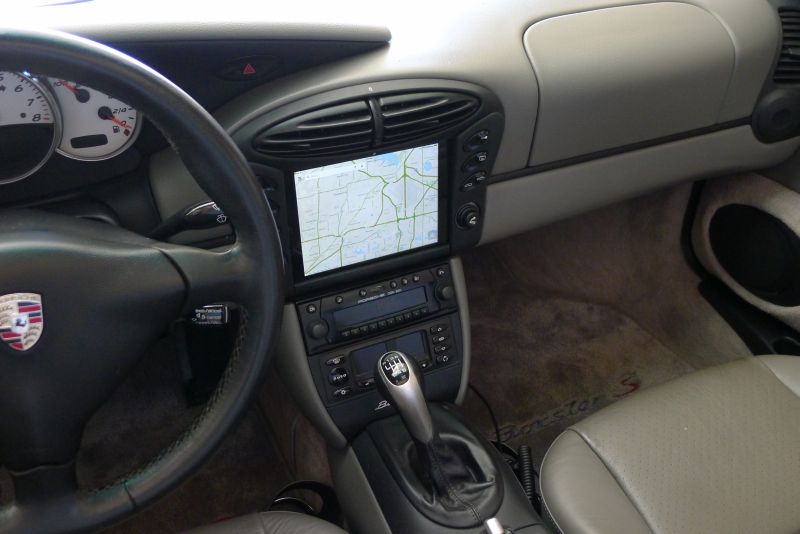
Yes they are a ******! I routed them like you did but the yellow connector and the black connector were short by about an inch to fully pull the radio out. Soooooooo, I got the dremel back out and cut out the two squares on the side of the console of the drivers side.

With that hole, I can connect and un-connect with only minor bloodshed. I am very good at it now because I had to track down a high pitched noise in the radio. Turns out, at some point in this car's life, one of the wires in the yellow connector harness got cut and someone tried to reconnect it by twisting the ends and then wrapping in electrical tape. Well, that connection was loose. I added some wire and made a better connection and now, no more high pitch squeal!
Now for my bad news. I cracked the screen this afternoon  I thought I would score the plastic horseshoe with a utility knife so that I would have a clean edge when I Dremeled. Well, being the smart guy that I am  , I figured I would use the edge of the ipad as a guide for how far out the slot should be. DON'T DO THAT! It worked fine when I did it on the top slot, but when I was scoring the bottom lip, all of a sudden CRACK! Oh well, I have an appointment tomorrow at the apple store to get it swapped out. Live and learn. By the way, scoring does give a nice clean edge. I also put painter's tape along the score to help me see my line.
Thanks for your help Shehadehd for your help! Hopefully my adapter will show up tomorrow and I will have an ipad without a cracked screen and I can call this project done. I love the way it looks! I will post some pictures of the finished product when it is all put together.
__________________
______________________________________________
2001 Boxster S Lapis Blue
TS Cat Bypass Pipes and exhaust
iPad Mini Dash Install
DEPO Tail Lights
|
|
|
|
|
11-10-2013, 06:35 PM
|
#86
|
|
Registered User
Join Date: Jun 2012
Location: Bedford, TX
Posts: 2,755
|
It's interesting that your harness looks like it is on the right side. Mine was on the left.
__________________
______________________________________________
2001 Boxster S Lapis Blue
TS Cat Bypass Pipes and exhaust
iPad Mini Dash Install
DEPO Tail Lights
|
|
|
|
|
11-11-2013, 12:17 PM
|
#87
|
|
Registered User
Join Date: Aug 2013
Location: Bay Area
Posts: 700
|
Hahaha..Im sorry to laugh but I have to admit, I chuckled when I read that you cracked your screen. This is why its a do it YOURSELF haha...
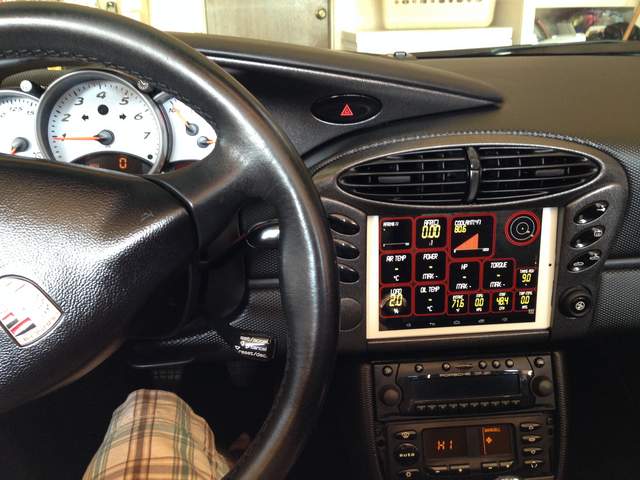
Well I got finished with my install this weekend. Wiring was a bit cumbersome but, if you take 5 minutes to work the slack out of the wires, you get enough to plug them into the back on the HU after you slide it into place.
On another note, I used an android tablet with the exact same dimensions as the iPad mini, and I did that so i can use my obd2 bluetooth to get realtime info on tons of stuff from the car. You can also set up very specific actions to happen at specific times with android. Like when power is applied to the tablet, turn the screen on and load the Torque app, start music and set brightness at 100%. When loss power, brightness to 0%, timeout to 20seconds and turn off bluetooth and wifi (to save power when not in car all day) and other cool things. Does my bluetooth music AND obd2 info at the same time! I tapped the optional phone power plug (which was unused) and do not have any alternator whine through the bluetooth music.
|
|
|
|
|
11-11-2013, 12:22 PM
|
#88
|
|
Registered User
Join Date: Sep 2013
Location: Bay Area, CA
Posts: 310
|
Quote:
Originally Posted by epapp
Hahaha..Im sorry to laugh but I have to admit, I chuckled when I read that you cracked your screen. This is why its a do it YOURSELF haha...
Well I got finished with my install this weekend. Wiring was a bit cumbersome but, if you take 5 minutes to work the slack out of the wires, you get enough to plug them into the back on the HU after you slide it into place.
On another note, I used an android tablet with the exact same dimensions as the iPad mini, and I did that so i can use my obd2 bluetooth to get realtime info on tons of stuff from the car. You can also set up very specific actions to happen at specific times with android. Like when power is applied to the tablet, turn the screen on and load the Torque app, start music and set brightness at 100%. When loss power, brightness to 0%, timeout to 20seconds and turn off bluetooth and wifi (to save power when not in car all day) and other cool things. Does my bluetooth music AND obd2 info at the same time! I tapped the optional phone power plug (which was unused) and do not have any alternator whine through the bluetooth music.
|
I see it gets cold in your car too :P
|
|
|
|
|
11-11-2013, 09:13 PM
|
#89
|
|
Registered User
Join Date: Aug 2013
Location: Bay Area
Posts: 700
|
Yes here in this ocean city it is always cold. Esp. when you put the top down every time you drive...
...moment of silence for those of us with a hardtop...
|
|
|
|
|
11-12-2013, 03:51 PM
|
#90
|
|
Registered User
Join Date: Jun 2012
Location: Bedford, TX
Posts: 2,755
|
__________________
______________________________________________
2001 Boxster S Lapis Blue
TS Cat Bypass Pipes and exhaust
iPad Mini Dash Install
DEPO Tail Lights
|
|
|
|
|
11-12-2013, 04:08 PM
|
#91
|
|
Registered User
Join Date: Sep 2013
Location: Bay Area, CA
Posts: 310
|
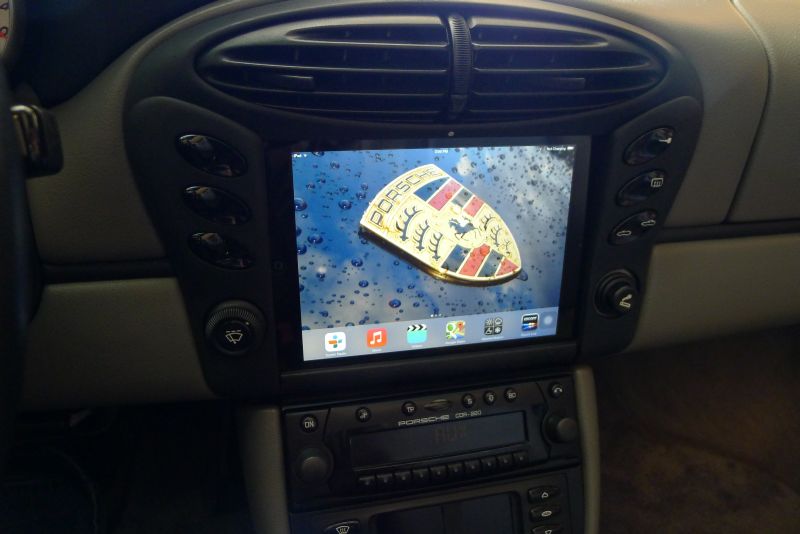
Nice! It looks great! I love the wallpaper btw.
When I finished the install, I noticed the same visibility problem with the top down, especially in direct sunlight. I ended p getting an iVisor matte screen protector and it REALLY helped. The screen protector is suppose to reduce the quality of the display, but from the distance we will use the iPad, it's virtually indistinguishable. The matte protector also comes with the perk of being smudge resistant and this also really helps in visibility. I think I posted a picture of the ipad in direct sunlight with the protector on it...
As for the turn off, I have my ipad set to 10 min lock delay and just live with the fact that it will take some time before the display shuts off after leaving the car. Epapp mentioned that with a jailbroken iPad, you could have much more control over the iPad. I believe you can repurpose certain parts of the screen to do certain actions that will make it much more user-friendly in a car (like turn off the display with a three finger tap).
Also, the nice thing is, apple products don't really depreciate to quickly so if you decide you don't like it, you won't take to big of a hit.
|
|
|
|
|
11-12-2013, 04:54 PM
|
#92
|
|
Registered User
Join Date: Jun 2012
Location: Bedford, TX
Posts: 2,755
|
Thanks, I will take a look at that screen protector. I have mine set at 15 minutes but I usually just turn it off. I agree on holding their value. I sold my original 3 year old 64gb iPad last year for $305 on eBay. Used it to upgrade to the then new one. My iPhone 4S is jail broken but I am now several IOS's behind. It will be awhile before 7 gets broken. Oh well, I like they way everything syncs seamlessly between my various devices. My wallpaper is a shot of my hood during a wash, it's one of my favorites. Thanks for your help
__________________
______________________________________________
2001 Boxster S Lapis Blue
TS Cat Bypass Pipes and exhaust
iPad Mini Dash Install
DEPO Tail Lights
|
|
|
|
|
11-12-2013, 05:00 PM
|
#93
|
|
Registered User
Join Date: Jun 2012
Location: Bedford, TX
Posts: 2,755
|
__________________
______________________________________________
2001 Boxster S Lapis Blue
TS Cat Bypass Pipes and exhaust
iPad Mini Dash Install
DEPO Tail Lights
|
|
|
|
|
11-12-2013, 05:15 PM
|
#94
|
|
Registered User
Join Date: Sep 2013
Location: Montreal, QC. (currently expat to Shanghai)
Posts: 3,249
|
Quote:
Originally Posted by BruceH
|
Bloody hell, nice work to you guys!!!!!!!!!!!! Wife was asking me what I was missing (boy toy-wise) having xmas in mind. Mini iPad is coming soon I think
There you go Shehadehd, someone with good taste for wallpaper.
__________________
______________________________
'97 Boxster base model 2.5L, Guards Red/Tan leather, with a new but old Alpine am/fm radio.
Last edited by Nine8Six; 11-12-2013 at 05:17 PM.
|
|
|
|
|
11-12-2013, 05:23 PM
|
#95
|
|
Registered User
Join Date: Sep 2013
Location: Bay Area, CA
Posts: 310
|
Ipad mini in-dash installation
Quote:
Originally Posted by BruceH
|
That's exactly the one. It's absolutely effortless to put it on. Just make sure your screen is clean. The nice thing is that if you mess up you can just wash it, let it dry, and then put it on again.
By the way, what do you mean by you lock it manually? My lock button is behind the cloverleaf trim. How do you access yours?
__________________
If you are interested in a Comfort-Top module, please visit:
https://www.enhancedautomods.com/shop/comfort-top
|
|
|
|
|
11-12-2013, 05:24 PM
|
#96
|
|
Registered User
Join Date: Sep 2013
Location: Bay Area, CA
Posts: 310
|
Ipad mini in-dash installation
Quote:
Originally Posted by Nine8Six
Bloody hell, nice work to you guys!!!!!!!!!!!! Wife was asking me what I was missing (boy toy-wise) having xmas in mind. Mini iPad is coming soon I think
There you go Shehadehd, someone with good taste for wallpaper.
|
I'll have you know This is my new one :-)

I understand if you're jealous. Muahaha
__________________
If you are interested in a Comfort-Top module, please visit:
https://www.enhancedautomods.com/shop/comfort-top
Last edited by Shehadehd; 11-12-2013 at 05:27 PM.
|
|
|
|
|
11-12-2013, 05:33 PM
|
#97
|
|
Registered User
Join Date: Jun 2012
Location: Bedford, TX
Posts: 2,755
|
Quote:
Originally Posted by Shehadehd
By the way, what do you mean by you lock it manually? My lock button is behind the cloverleaf trim. How do you access yours?
|
Go to settings > general > accessibility > AssistiveTouch and select on. This gives you a little round button in a square, you can see it on the bottom right corner of my screen. Touching it gives you several choices. To lock the screen, touch the button, select device and then lock screen, viola! You can also rotate the screen, adjust volume and other items. You can move it any where you want on the screen. Love the new wallpaper
__________________
______________________________________________
2001 Boxster S Lapis Blue
TS Cat Bypass Pipes and exhaust
iPad Mini Dash Install
DEPO Tail Lights
|
|
|
|
|
11-12-2013, 05:54 PM
|
#98
|
|
Registered User
Join Date: Sep 2013
Location: Montreal, QC. (currently expat to Shanghai)
Posts: 3,249
|
Quote:
Originally Posted by Shehadehd
I'll have you know This is my new one :-)
I understand if you're jealous. Muahaha
|
Only jealous? nahhh
I am VERY jealous. This mod is in the pipeline for sure mate. Thanks to both of you for the details and DYI on that. Really looks good (less your original cliché 62 years old style wallpaper of course).
Very nice! All of it
__________________
______________________________
'97 Boxster base model 2.5L, Guards Red/Tan leather, with a new but old Alpine am/fm radio.
|
|
|
|
|
11-13-2013, 10:20 AM
|
#99
|
|
Registered User
Join Date: Sep 2013
Location: Bay Area, CA
Posts: 310
|
Bruce, thanks so much for that bit of info. Now I don't have to worry about my top getting ripped for the first 10 minutes I leave my car.
Nine8six... You definitely need to try this mod, at least for the sake of uniqueness. If you want the install for OBD purposes, epapps android might be better though. I don't know if China has 4g so you might not be able to get all the use out of an iPad.
__________________
If you are interested in a Comfort-Top module, please visit:
https://www.enhancedautomods.com/shop/comfort-top
|
|
|
|
|
11-13-2013, 10:51 AM
|
#100
|
|
Registered User
Join Date: Jun 2012
Location: Bedford, TX
Posts: 2,755
|
The AssistiveTouch touch is a neat little trick! Glad it worked for you. I still haven't signed up for the 4g yet, I have to go to the Sprint store to add it to my account, they won't give me their 2gb for $14.99 over the phone  I am currently using the 3G off of my iPhone.
Do you guys have a good recommendation for an OBD reader for the iPad? And an App to go with it? I ordered the anti glare screen so it should be here tomorrow.
__________________
______________________________________________
2001 Boxster S Lapis Blue
TS Cat Bypass Pipes and exhaust
iPad Mini Dash Install
DEPO Tail Lights
|
|
|
|
 Posting Rules
|
You may not post new threads
You may not post replies
You may not post attachments
You may not edit your posts
HTML code is On
|
|
|
All times are GMT -8. The time now is 10:24 AM.
| |



 Boxy Grannis
 2001 Boxster S
 Growly Grannis/Sex stallion

 Linear Mode


