Go Back   986 Forum - The Community for Porsche Boxster & Cayman Owners > Porsche Boxster & Cayman Forums > Boxster General Discussions

Post Reply
 
LinkBack Thread Tools Display Modes
Old 04-12-2016, 09:47 AM   #1
Registered User
 
Join Date: Aug 2015
Location: Boise, ID
Posts: 83
Quote:
Originally Posted by fridsten View Post
Ok, so I've dug a bit deeper into this. I'm not going for a CDR-22 anymore.

I've removed the handset and the navi unit. My plan is to remove the CD changer too. Then I'd like to replace the head unit with a simple 1-DIN stereo, but keep the factory amplifier, so I can keep the original cables.

I've found a 2-DIN frame and an active adapter for the sound system on eBay, so getting a 2-DIN unit and mounting it will probably not be that big a problem. But is there some way to mount a 1-DIN unit and a storage bin in a 2-DIN frame?
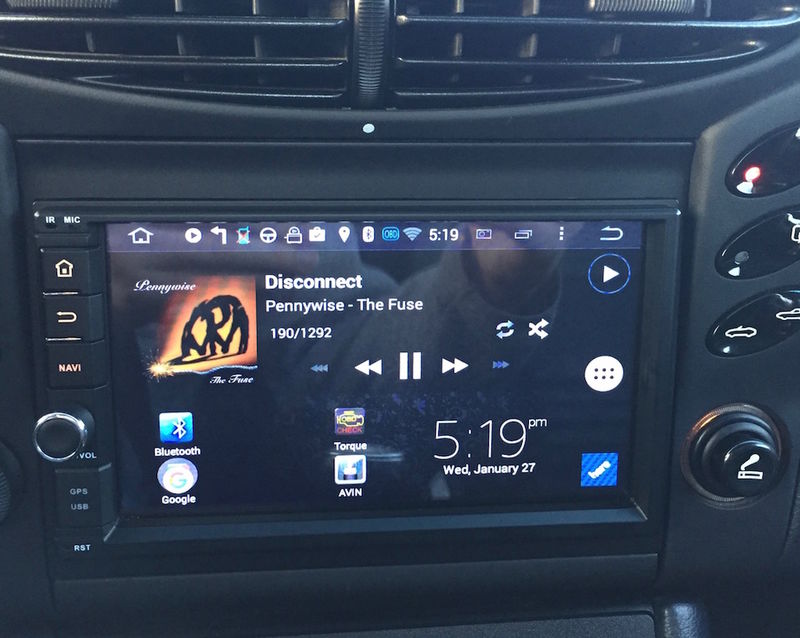
I suppose it's possible, but I've not done it. I'm about to replace the PCM1 unit in my gf's '03 with a 2-din Android unit. While I'm in the process of that (sometime this week), I'll check to see if it'd be possible to put the single DIN parts from my '01 in. I'm keeping my stock parts (I've already installed a 7" 2-DIN Android unit in my car), but I reckon you can find the required parts on eBay.

The reason I went with a 2-DIN unit are:

1. I'm a gadget nerd
2. Backup camera (my unit also has a dash cam that records to the head unit.)
3. Up-to-date navigation without having to stick something to my dash or windshield.
4. The ability to have a nice-looking stereo that fits all of my music on a micro SD card

My only gripe about the Android head unit is the lackluster AM reception.

Here's a horrible picture of my installation, my home screen has changed a bit since this photo.

Last edited by thatguychad; 04-12-2016 at 09:58 AM.
thatguychad is offline   Reply With Quote
Old 04-12-2016, 09:57 AM   #2
Registered User
 
Join Date: Aug 2015
Location: Boise, ID
Posts: 83
Here's a more recent screenshot of the unit, I switch between TomTom Go and Here maps. Here Maps is completely free, TomTom Go is cheap, but I haven't decided if I use it enough to warrant any cost.

thatguychad is offline   Reply With Quote
Old 04-13-2016, 01:49 AM   #3
Registered User
 
fridsten's Avatar
 
Join Date: Aug 2015
Location: Stockholm, Sweden
Posts: 282
Quote:
Originally Posted by thatguychad View Post
Here's a more recent screenshot of the unit, I switch between TomTom Go and Here maps. Here Maps is completely free, TomTom Go is cheap, but I haven't decided if I use it enough to warrant any cost.
That looks great. What unit is that?
I don't care much for navigation, since I use my phone for that (CoPilot app with Europe maps). How do you connect to the internet in order to use Google Play? Does the unit have a SIM card slot? Wifi?

I don't care about AM reception, as long as it has RDS.
fridsten is offline   Reply With Quote
Old 04-13-2016, 07:48 AM   #4
Registered User
 
Join Date: Aug 2015
Location: Boise, ID
Posts: 83
Quote:
Originally Posted by fridsten View Post
That looks great. What unit is that?
This particular unit is branded as an Eonon GA2114 (1.6GHz quad-core RockChip processor with an 800x480 screen) that I got off of eBay for about $300, but they're also out there with Joying and other brands; some, like the Joying unit have higher resolution 1024x600 screens.. All the same manufacturer, different ROMs. I didn't like the stock launcher (what you see on the screen; icon layout, widgets, etc) with this unit, so I spent $5 on Nova Launcher and downloaded some other apps to customize it to my liking. I use PowerAmp as my media player and Chronus or Xperia Clock for the time/weather in the lower right corner, depending on my mood, apparently.

Quote:
Originally Posted by fridsten View Post
I don't care much for navigation, since I use my phone for that (CoPilot app with Europe maps). How do you connect to the internet in order to use Google Play? Does the unit have a SIM card slot? Wifi?

I don't care about AM reception, as long as it has RDS.
My original intention was just to run the unit in offline mode for mapping, which Here maps does very well (TomTom may also do well offline, but I haven't tested it as extensively), and update it from my home wifi. That changed when I was able to find a 4G LTE wifi hotspot that I could use as a true pre-paid hotspot. I buy chunks of data and use them as I go, only "refilling" when I get low...no monthly contracts.

There were several hotspots that advertised "no monthly contracts", but if you didn't pay the next month, your minutes expired...sounds like a month-to-month contract to me. The only stipulation with my hotspot is that I must download 1MB (yes, megabyte) of data every 60 days to keep my minutes from expiring....not a problem. I purchased 3GB worth of data on March 23rd and my data balance is currently 2.5GB.

You can get a USB 3g modem and use that, but there's only a handful of modems supported (mostly Huawei) and the wifi hotspot is more versatile.

It does have RDS support and some people have DAB hardware running on them, too. We don't have DAB in the US, so I'm unfamiliar with it.

Overall, for my $300, I'm very happy with the unit (with the noted exception of AM reception, which I may try to improve.) I bought the girlfriend a different Android head unit which isn't supported as well as my unit, but she wanted a CD/DVD slot so she could use physical media if she wanted.
thatguychad is offline   Reply With Quote
Post Reply


Posting Rules
You may not post new threads
You may not post replies
You may not post attachments
You may not edit your posts

BB code is On
Smilies are On
[IMG] code is On
HTML code is On
Trackbacks are On
Pingbacks are On
Refbacks are On


All times are GMT -8. The time now is 03:37 PM.


Powered by vBulletin® Version 3.8.7
Copyright ©2000 - 2025, vBulletin Solutions, Inc.
Content Relevant URLs by vBSEO 3.6.0
Copyright 2025 Pelican Parts, LLC - Posts may be archived for display on the Pelican Parts Website -    DMCA Registered Agent Contact Page